
 By sl lives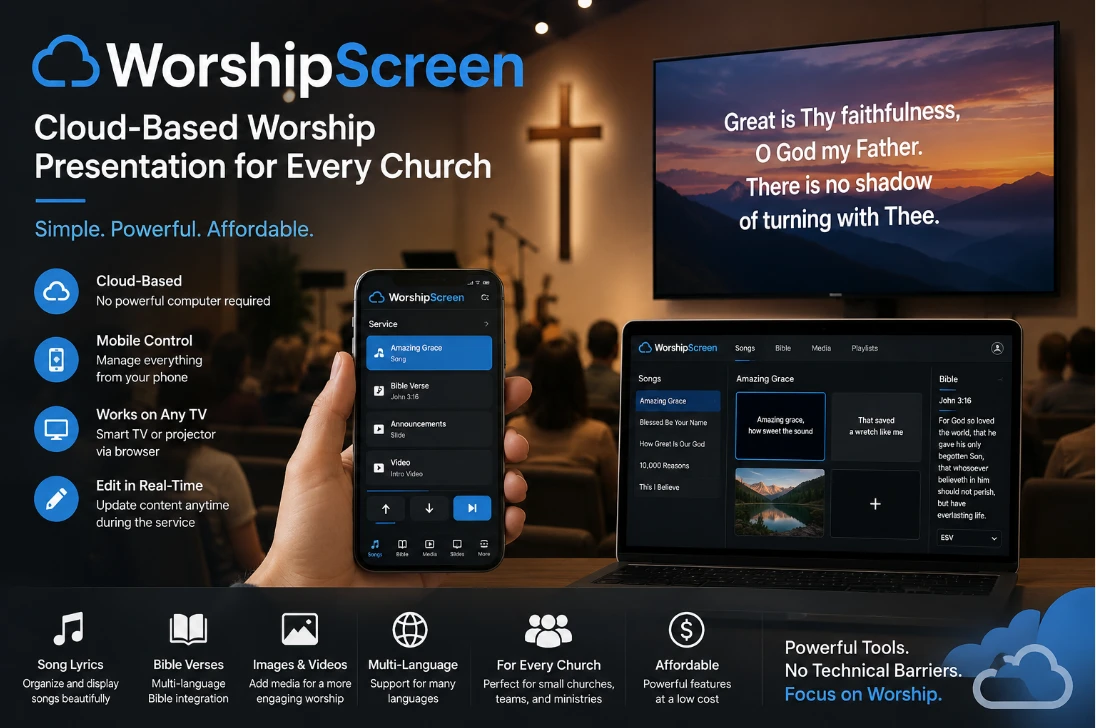
The Easiest Way to Organize Church Text Projection Without Expensive Equipment
Digital Worship Presentations for Modern Churches
Technology has become an essential part of church services. Displaying worship lyrics, Bible passages, announcements, sermon notes, photos, and videos on large screens helps congregations stay engaged and makes every service easier to follow. Churches of every size are looking for presentation solutions that are reliable, simple to operate, and affordable.
Several years ago, creating a church presentation system required expensive computers, complicated software, and experienced operators. Today, cloud technology has completely changed this process. Even a small church can organize professional presentations without purchasing a modern computer or building a complex media system.
The most important part of any presentation setup is selecting the right church presentation software. A good platform should be easy for volunteers to learn while providing all the tools needed for worship services.
What Is Needed to Display Lyrics and Bible Verses in Church?
A complete church presentation system requires much less equipment than many churches expect.
The basic setup includes:
- A Smart TV, television, or projector
- Internet access
- A smartphone, tablet, or computer for control
- Presentation software
A Smart TV with a built-in browser can display presentations directly without requiring a separate computer beside the screen.
If the church already has a projector or television connected through HDMI, the same presentation software can also be used without changing the existing installation.
Because modern cloud platforms process presentations online, there is no need for expensive hardware.
Why Traditional Church Presentation Programs Can Be Difficult
Many presentation programs work only after being installed on a local computer.
Every slide, transition, image, and video is processed by that computer. As presentations become more advanced, churches often discover that older computers no longer provide enough performance.
This creates several challenges:
- Expensive computer upgrades
- More complicated installation
- Software maintenance
- Technical troubleshooting
- Higher equipment costs
Small churches often do not have dedicated media teams or budgets for modern computers. They need a presentation system that works reliably without depending on expensive hardware.
WorshipScreen Uses Cloud Technology
WorshipScreen offers a completely different approach.
Instead of relying on the power of the local computer, the platform performs all major processing on its own cloud servers.
The church computer is used only to control the presentation. Heavy processing does not take place on the local device.
This provides several important advantages.
Older computers continue working perfectly.
Smartphones can control the entire presentation.
The church does not need to invest in high-performance hardware.
Because everything runs on the WorshipScreen servers, presentations remain smooth and reliable even when multimedia content is used.
This makes the platform especially suitable for churches where purchasing a modern PC is not possible.
Designed for Simple Operation
One of the biggest advantages of WorshipScreen is its ease of use.
The interface has been created specifically for churches instead of professional production studios.
Volunteers can quickly learn how to:
- Create presentations
- Organize worship songs
- Display Bible passages
- Show announcements
- Add multimedia
The software does not require advanced technical knowledge.
Even users with very little experience can prepare worship services after only a short introduction.
Complete Smartphone Control
Modern churches increasingly prefer mobile solutions.
WorshipScreen has been fully optimized for smartphone management.
Almost every presentation function can be controlled directly from a mobile phone.
Using a smartphone, users can:
- Change worship lyrics
- Display Bible passages
- Switch between presentations
- Control videos
- Show announcement slides
- Navigate through songs
The operator is free to move throughout the church instead of remaining behind a computer.
This flexibility is especially useful for volunteer teams.
Display Presentations Directly on a Smart TV
Another major advantage of WorshipScreen is browser-based presentation.
A Smart TV can open the presentation directly through its internet browser.
The television becomes the presentation screen while the operator controls everything remotely from a smartphone or computer.
No additional cables are required between the operator and the display.
For churches that already use projectors or standard televisions, WorshipScreen also supports direct HDMI connection.
This allows churches to continue using their existing equipment while taking advantage of modern cloud technology.
Edit Presentations During the Service
Church services are dynamic.
Sometimes another worship song is added.
Sometimes the pastor wants to display additional Scripture.
Sometimes announcements change shortly before the service begins.
WorshipScreen allows presentations to be edited even while they are already running.
Users can add new lyrics, modify existing slides, insert Bible passages, and update announcements immediately.
There is no need to stop the presentation or create an entirely new project.
This flexibility helps churches adapt naturally to live worship.
Automatic Song Slide Creation
Preparing worship songs manually can require a significant amount of time.
WorshipScreen automatically divides song lyrics into presentation slides that are easy for the congregation to read.
This improves readability while reducing preparation time for volunteers.
Churches can organize their worship music library and quickly prepare songs for future services.
Bible Presentation Features
Bible projection is one of the most important functions of any church presentation system.
WorshipScreen allows Scripture to be displayed verse by verse, making sermons and Bible studies easier to follow.
The software includes a large collection of Bible translations in multiple languages.
This allows churches serving multilingual communities to prepare presentations that match the language of their congregation.
Photos, Videos, and Multimedia
Church presentations often include much more than lyrics.
WorshipScreen allows churches to display:
- Photo slides
- Background images
- Video presentations
- Ministry announcements
- Sermon graphics
Everything can be managed from one platform without switching between multiple programs.
This simplifies preparation while creating a more professional worship experience.
Ideal for Small Churches
Many churches do not have dedicated media departments.
Often, one volunteer manages worship presentations while serving in other ministries at the same time.
WorshipScreen has been developed specifically to make this work easier.
The platform is simple enough for volunteers while providing all the tools required for modern worship presentations.
Because the software performs all major processing on cloud servers, churches do not need expensive computers or complex technical systems.
For many congregations, the complete presentation setup consists of only:
- A Smart TV with an internet browser
- Internet access
- A smartphone
This simple combination is enough to organize professional worship software for displaying worship lyrics, Bible passages, announcements, photos, and videos.
Churches that prefer traditional installations can connect directly to a television or projector using an HDMI cable, while those choosing a wireless setup can display presentations directly through the Smart TV browser and control everything remotely from a smartphone or computer. This flexibility allows WorshipScreen to adapt to almost any church environment while keeping installation simple, reducing equipment costs, and making professional church presentations accessible to congregations of every size.